Search This Blog

Showing posts with label OC4J. Show all posts

Monday, 22 March 2010

Universal Connection Pool (UCP) with OC4J 10.1.3.x

I setup a native OC4J 10.1.3.x Data Source using the Oracle UCP and allthough I didn't really do much more then that it did work. Personally I would stick with ICC in OC4J 10.1.3.x and the default pool implementation but if you have a pressing need to use UCP this would work.

Note: This demo is based on using stand alone OC4J so the container in this case is known as "home"

1. Ensure that the container or stand alone OC4J is using the 11.1.0.7 JDBC driver. I created a shared library as follows which automatically use the latest version. For some reason the 10.1.0.5 default driver won't work here.

Name: oracle.jdbc
Version: 11.1.0.7


2. I wanted to test my data source from asconsole so to do that I needed to edit the $ORACLE_HOME\j2ee\home\application-deployments\ascontrol\orion-application.xml file of the deployed ascontrol application, and comment out the line that removes the importing of the global.libraries.xml file, as shown below.


<imported-shared-libraries>
<!--
<remove-inherited name="global.libraries"/>
-->

<import-shared-library name="oracle.xml.security"/>
</imported-shared-libraries>

3. Create a native Data Source as follows in your data-sources file.

<native-data-source
name="jdbc/UcpNativeDS"
jndi-name="jdbc/UcpNativeDS"
description="UCP Native DataSource"
data-source-class="oracle.ucp.jdbc.PoolDataSourceImpl"
user="scott"
password="tiger"
url="jdbc:oracle:thin:@beast.au.oracle.com:1522:linux10g">
<property name="connectionFactoryClassName"
value="oracle.jdbc.pool.OracleDataSource"/>
<property name="connectionPoolName" value="TestPool"/>
<property name="initialPoolSize" value="1"/>
<property name="maxPoolSize" value="20"/>
</native-data-source>
4. Copy ucp.jar , version 11.1.0.7, into $ORACLE_HOME/j2ee/home/applib of the container.

5. Stop/Start OC4J

6. Test the Data Source from asconsole as follows, which should then work for J2EE applications as well.


Monday, 15 March 2010

OC4J 10.1.3.x - Accessing a Data Source remotely without oc4jadmin user

I previously showed how one would remotely access JNDI object's which include EJB's , Data Sources etc as shown in this post below.

http://theblasfrompas.blogspot.com/2008/07/enable-remote-clients-to-access-oas.html

Typically internally I use oc4jadmin who has access to everything and of course it has no issues. However in the real world 2 things are just about certain.

1. A Data Source would most likely be created at the container level for applications to share allthough it's not uncommon for them to be created at the application level.

2. The OAS administrator would almost certainly provide a separate user for JNDI access.

With such a setup the user created won't be able to access container specific JNDI objects such as data sources as most likely the OAS administrator won't make the user given part of the "oc4j-administrators" group. In this case the same principals as the blog entry apply however you won't find a container orion-application.xml.

So assuming you have a Data Source created in the HOME container you would need to alter the file below and then stop/start the instance to allow users to access container specific JNDI objects such as a Data Source. This demo assumes your user is part of the group called "users" as per the blog entry above.

$ORACLE_HOME/j2ee/home/config/application.xml


<namespace-access>
<read-access>
<namespace-resource root="">
<security-role-mapping>
<group name="oc4j-administrators" />
<group name="ascontrol_admin" />
<group name="users" />
</security-role-mapping>
</namespace-resource>
</read-access>
<write-access>
<namespace-resource root="">
<security-role-mapping>
<group name="oc4j-administrators" />
<group name="ascontrol_admin" />
<group name="users" />
</security-role-mapping>
</namespace-resource>
</write-access>
</namespace-access>

Thursday, 2 July 2009

Dynamic JMX Service URL for OC4J 10.1.3.x

Not for myself, the following code will dynamically generate a JMX service URL without using OPMN port.

private String url =
"service:jmx:ormi://" + System.getProperty("hostname.rmi") +
":" + System.getProperty("port.rmi");

Wednesday, 8 April 2009

New Wait option for Sequential Redeployment in a clustered OAS 10.1.3.2 setup

When you have an application using HTTP session replication setup in a HA cluster on OAS 10.1.3.2 and above you can easily ensure that when you deploy a new version of that application it will continue to run with no down time. What's important here is you select the correct deployment option.

Redeploying with ASC

If you use ASC for the deployment then your effectively redeploying to the cluster in parallel - all nodes in cluster will get notified and process the deployment in parallel. That means you will most likey have down time and get errors for those currently using your application.

Redeploy with admin_client.jar or redeploy Ant task

With these two deployment choices you can specify sequential and keepsettings options however in some circumstances the session state of an application may be lost when you redeploy an application to a cluster.

In Oracle Containers for J2EE release 10.1.3.2 or 10.1.3.1, you can use either the waitsec parameter of the admin_client.jar -sequential waitsec subswitch or the sequentialDelay property of the redeploy Ant task to specify a number of seconds between redeployments to different OC4J instances in a cluster. This delay can provide enough time for replication of session state

For example, the following admin_client.jar command specifies a wait time of 15 seconds between redeployments to different OC4J instances:
java -jar admin_client.jar deployer:cluster:opmn://host:port/home oc4jadmin
password -redeploy -file "myapp.ear" -deploymentName rolling -sequential 15
-keepsettings
It's documented here, make sure your using 10.1.3.2 or above for this

http://download.oracle.com/docs/cd/B32110_01/relnotes.1013/b32200/oc4j.htm#CHDJJFIG
10.1.14 New Wait Option for Sequential Redeployment to a Cluster

Wednesday, 25 March 2009

Providing logout functionailty for Secure OC4J Apps in 10.1.3.x

I recently had to determine how to logout of an OC4J 10.1.3.x application which was secured against a 3rd party LDAP server, using HTTP Basic authentication. Normally for web based applications you can control when to logout calling invalidate() from the HTTPSession object as shown below or wait until the session times out which it will then do for you automatically.

HttpSession.invalidate()


The problem here is when using HTTP basic authentication browsers typically 'cache' HTTP basic authentication credentials and re-send them when necessary.

Specifying FORM as the authentication scheme in web.xml (along with HttpSession.invalidate()) will address this issue of provinding a logout link which gives you control of when your user wants to logout. The authentication scheme chosen is depending on your requirements so if logout isn't important then HTTP basic will do, but typically I would expect HTTP basic to be used very rarely.

Tuesday, 3 March 2009

OAS 10.1.3.x : SSL With Oracle JDBC Thin Driver

The following how-to demonstrates, creating a self signed oracle wallet for the server and client, configuring the database to use TCPS and finally create a data source on OC4J 10.1.3.x.

Create the wallets

For an example on how to create the server and client keys/certificates see the following metalink note. The examples are created using orapki utility which creates a standard PKCS12 format to store X.509 certificates and private keys.

Note 762286.1 - End To End Examples of using SSL With Oracle's JDBC THIN Driver

Setup OC4J to use JDBC/THIN with SSL

1. Create a java class as follows, and package it up in a JAR file called "JDBCStartup.jar". This startup class file enables Oracle PKI provider dynamically.

/**
*
* add the following lines to your server.xml
<init-library path="<path_to_JDBCSSLSetup.jar>" />
<startup-classes>
<startup-class classname="JDBCSSLSetup" failure-is-fatal="false">
<execution-order>0</execution-order>
</startup-class>
</startup-classes>

*/


import javax.naming.*;
import java.util.*;
import java.security.Security;
import oracle.security.pki.OraclePKIProvider;
import oracle.j2ee.server.OC4JStartup;

/**
* JDBC over SSL setup startup class for OC4J
*/


public class JDBCSSLSetup implements OC4JStartup
{
/**
* Public, no-argument constructor: required by the Oracle startup class spec
*/

public JDBCSSLSetup()
{
}

public String preDeploy(Hashtable args, Context context) throws Exception
{
// instantiate OraclePKIProvider and put it into provider slot #3
Security.insertProviderAt(new OraclePKIProvider(), 3);
System.out.println("JDBCSSLSetup startup class: OraclePKIProvider has been successfully instantiated");

return "ok";
}

public String postDeploy(Hashtable args, Context context) throws Exception
{
return null;
}
}

2. Place the JAR file into $ORACLE_HOME/j2ee/{container-name}/applib directory.

3. Edit $ORACLE_HOME/j2ee/{container-name}/config/server.xml as follows to add the startup class to the container.


<init-library path="../applib/JDBCStartup.jar" />
<startup-classes>
<startup-class classname="JDBCSSLSetup" failure-is-fatal="true" >
<execution-order>0</execution-order>
</startup-class>
</startup-classes>


4. Restart the container as shown below.

> opmnctl stopproc process-type=pas

> opmnctl startproc process-type=pas

5. OAS 10..1.3.x comes with JDBC driver 10.1.0.5 , you will need to use the latest 10g JDBC driver or 11g JDBC driver, to switch to that driver follow the following metalink how to document. You should add the required JAR files below to the shared library along with the JDBC JAR file.

Note 420303.1 - How to Use The Latest Thin JDBC Driver Across All Applications For a 10.1.3.x OAS Container

If you are using 11g database you will also need these 2 JAR files added to the shared library.
  • $ORACLE_HOME/jlib/osdt_cert.jar
  • $ORACLE_HOME/jlib/osdt_core.jar
If you are using 10g database you will also need this JAR file added to the shared library.
  • $ORACLE_HOME/jlib/ojpse.jar
6. You should be using the latest JDBC driver as per your $ORACLE_HOME/j2ee/{container-name}/config/system-application.xml. In this example we are using the 11.1.0.7 JDBC driver.


<import-shared-library name="oracle.jdbc" min-version="11.1.0.7"/>


7. Now re-start the container to ensure it picks up the latest JDBC driver which should have been done in the note above.

> opmnctl stopproc process-type=pas

> opmnctl startproc process-type=pas


8. Now you can go ahead and create a data source which is using TCPS either through asconsole or manually editing $ORACLE_HOME/j2ee/{container-name}/config/data-sources.xml

Here we will manually edit data-sources.xml and add a managed data source and connection pool to support our SSL setup. We must use the factory class "oracle.jdbc.OracleDriver" as we need to pass properties to the driver.

<managed-data-source
connection-pool-name="TCPSConnectionPool"
jndi-name="jdbc/jdbcSSLDS"
name="jdbc/jdbcSSLDS"/>

<connection-pool name="TCPSConnectionPool">
<connection-factory
factory-class="oracle.jdbc.OracleDriver"
user="scott"
password="tiger"
url="jdbc:oracle:thin:@(DESCRIPTION=(ADDRESS=(PROTOCOL=tcps)
(HOST=beast.au.oracle.com)(PORT=2484))(CONNECT_DATA=(SERVICE_NAME=linux11g)))"

commit-record-table-name="">
<property
name="javax.net.ssl.trustStore"
value
="/home/u01/app/oracle/product/1013AS_red/network/admin/wallets/client/ewallet.p12"/>
<property
name
="javax.net.ssl.trustStoreType"
value
="PKCS12"/>
<property
name
="javax.net.ssl.trustStorePassword"
value
="myclient123"/>
</connection-factory>
</connection-pool>

In the example above we connect to the database through TCPS for SSL with Encryption and Authentication.

Note: The connect string should include TCPS as shown above.

9. Now in this example we manually edited data-sources.xml so we must re-start the container once again to pick up those changes.

> opmnctl stopproc process-type=pas

> opmnctl startproc process-type=pas


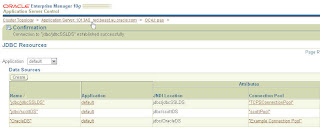
10. Finally we can test our data source using asconsole Data Sources page as shown below.


More Information

For more information regarding SSL With Oracle JDBC Thin Driver see the following white paper

http://www.oracle.com/technology/tech/java/sqlj_jdbc/pdf/wp-oracle-jdbc_thin_ssl.pdf

Tuesday, 24 February 2009

How to Create a JDBC/OCI Connection Pool For Stand Alone OC4J 10.1.3.x

Recently I had to setup JDBC/OCI connection pool in stand alone OC4J 10.1.3.x using an oracle client 10.2.0.3. The problem here is OC4J 10.1.3.x comes with JDBC driver 10.1.0.5 of ojdbc14.jar. Which means you will have issues using the 10.2.0.3 oracle client libraries.

As a result of that you must upgrade the driver to use the client version JDBC driver as well as set various environment variables before starting stand alone OC4J. The steps are as follows.

Note: This is based on OC4J 10.1.3.4 and on a windows environment, using instant client 10.2.0.3

1. Download 10.2.0.3 instant client as follows, in my case installed in directory as follows

D:\jdev\instant-clients\10203

You can download the 10.2.0.3 version from here.

http://www.oracle.com/technology/software/tech/oci/instantclient/

2. Open up command window and set environment variables as follows

set PATH=D:\jdev\instant-clients\10203;%PATH%
set TNS_ADMIN=D:\jdev\instant-clients\10203

Note: A tnsnames.ora exists in the directory D:\jdev\instant-clients\10203 and has the following entry which I will use in stand alone OC4J shortly.

LINUX10G =
(DESCRIPTION =
(ADDRESS = (PROTOCOL = TCP)(HOST = xxxx.au.oracle.com)(PORT = 1522))
(CONNECT_DATA =
(SERVER = DEDICATED)
(SERVICE_NAME = linux10g)
)
)

3. Start stand alone OC4J as follows, ensuring you use the same commend window from step 2 above.

set ORACLE_HOME=D:\jdev\stand-alone-oc4j\10134
set JAVA_HOME=D:\jdev\jdevprod\10134\jdk

D:\jdev\stand-alone-oc4j\10134\bin>oc4j -start
Starting OC4J from D:\jdev\stand-alone-oc4j\10134\j2ee\home ...
09/02/23 13:42:29 Oracle Containers for J2EE 10g (10.1.3.4.0) initialized

4. OC4J 10.1.3.x is using 10.1.0.5 JDBC driver which means it will have issues connecting using 10.2.0.3 instant client so we have to upgrade the JDBC driver to 10.2.0.3 as shown below for the whole container. Follow this metalink note to fix that so it matches the same version of instant client which would mean you use ojdbc14.jar from 10.2.0.3 jar file of ojdbc14.jar.

Note 420303.1 - How to Use The Latest Thin JDBC Driver Across All Applications For a 10.1.3.x OAS Container

You can download the 10.2.0.3 JDBC driver jar file from this link, but it should be available in your oracle client install.

http://www.oracle.com/technology/software/tech/java/sqlj_jdbc/index.html

5. Stop stand alone OC4J to pick up the shared library change.
6. Start stand alone OC4J.
7. Create a data source as follows.


<connection-pool name="ocitest-pool">
<connection-factory factory-class="oracle.jdbc.pool.OracleDataSource"
user="scott" password="tiger" url="jdbc:oracle:oci:@LINUX10G"/>
</connection-pool>


For more information on data sources refer to the following documentation.

Oracle® Containers for J2EE Services Guide
10g (10.1.3.1.0)
Part Number B28958-01
http://download-uk.oracle.com/docs/cd/B31017_01/web.1013/b28958/datasrc.htm#BABIDCBJ

Thursday, 19 February 2009

OC4J 10.1.3.x start order of Resource Adapters

In order to control the start order of Resource Adapters for an application you can use the start-order tag as described here in the docs within your oc4j-connectors.xml

Oracle® Containers for J2EE Resource Adapter Administrator's Guide
10g (10.1.3.1.0)
Part Number B28956-01
http://download.oracle.com/docs/cd/B32110_01/web.1013/b28956/xmlcnfg.htm#sthref532

Tuesday, 30 December 2008

Creating a READ ONLY user for Application Server Control 10.1.3.x

Today I was asked how to create a user with a read-only user for access to the Application Server Control pages. I always use oc4jadmin and obviously that built in account has full rights, but it turns out the easiest way to create a new user with READ ONLY access is as follows

1. Log into ASC
2. Click on the link "Setup" at the top of the page.
3. Click on "Users"
4. Click on the "Create" button.
5. Enter new username/password and press OK

By default the user you create here will be one with read-only access which by default will be assigned the role "
ascontrol_monitor".

Now you can login with this new user with
read-only user access to the Application Server Control pages.

The administration roles are documented here.

http://otndnld.oracle.co.jp/document/products/as10g/101300/B25221_03/core.1013/b25209/tools.htm
Table 2-2 Administrative Roles That You Can Assign to Application Server Control Administrators

Thursday, 4 September 2008

Displaying OC4J JVM MBean Statistics from a JMX Client

The JVM Mbean within an OC4J 10.1.3.x container has some useful statistic which are displayed in ASC MBean browser. Here is some code which shows how to obtain those from a JMX client.

So the MBean we want to access is as follows:

oc4j:j2eeType=JVM,name=single,J2EEServer=standalone

And the statistics we want to display which ASC shows for us are as follows:
  • FreeHeapSize
  • ActiveThreads
  • HeapSize
So here is the code we will use from a JMX Client. The method which obtains the statistics we need is called "showStats(ObjectName)"


package oracle.support.oc4j.standalone;

import java.text.DateFormat;

import java.util.Date;
import java.util.logging.Logger;

import javax.management.MBeanServerConnection;
import javax.management.ObjectName;
import javax.management.j2ee.statistics.JVMStats;
import javax.management.j2ee.statistics.Statistic;
import javax.management.j2ee.statistics.BoundedRangeStatistic;

public class JVMMonitor implements Runnable
{
private final Logger logger = Logger.getLogger(this.getClass().getName());
private static final DateFormat DATEFORMAT = DateFormat.getInstance();
private OC4JConnection con = null;
private MBeanServerConnection mbs = null;
private String targetMBean = "oc4j:j2eeType=JVM,name=single,J2EEServer=standalone";
private ObjectName mbean = null;

public JVMMonitor() throws Exception
{
// retrieve an OC4JConnection object this is a singleton class
con = OC4JConnection.getInstance();
mbs = con.getConnection();
mbean = new ObjectName(targetMBean);
System.out.println("** JVM Details **");
System.out.printf("Opmn Managed: %s\n",
mbs.getAttribute(mbean, "opmnEnabled"));
System.out.printf("Java Version: %s\n",
mbs.getAttribute(mbean, "javaVersion"));
System.out.printf("Java Vendor: %s\n",
mbs.getAttribute(mbean, "javaVendor"));
System.out.printf("Host Node: %s\n",
mbs.getAttribute(mbean, "node"));
System.out.printf("RMI Port: %s\n",
mbs.getAttribute(mbean, "rmiPort"));
System.out.printf("RMIS Port: %s\n",
mbs.getAttribute(mbean, "rmisPort"));
System.out.printf("RMI IP: %s\n",
mbs.getAttribute(mbean, "rmiServerAddress"));

}

public void run ()
{

System.out.println("\n");
try
{
System.out.printf("--> Current JVM Details [%s]\n\n",
DATEFORMAT.format(new Date()));


showStats(mbean);
System.out.printf("\n<-- End...\n");
}
catch (Exception e)
{
System.out.println("Error in run()");
e.printStackTrace();
}
finally
{
//con.close();
}
}

private void showStats(ObjectName cp) throws Exception
{

JVMStats stats =
(JVMStats) mbs.getAttribute(cp, "stats");

Object mem = null;
mem = mbs.getAttribute(cp, "totalMemory");
Long memLong = null;
memLong = (Long) mem;

System.out.printf("Total Memory: %s\n", memLong.intValue()/1024/1024 + "M");

mem = mbs.getAttribute(cp, "freeMemory");
memLong = (Long) mem;
System.out.printf("Free Memory: %s\n",
memLong.intValue()/1024/1024 + "M");

System.out.printf("HeapSize: %s\n",
stats.getHeapSize().getCurrent()/1024 + "M");
System.out.printf("HighWaterMark: %s\n",
stats.getHeapSize().getHighWaterMark()/1024 + "M");
System.out.printf("LowWaterMark: %s\n",
stats.getHeapSize().getLowWaterMark()/1024 + "M");

Statistic[] allStats = stats.getStatistics();

for (Statistic s: allStats)
{
if (!s.getName().equalsIgnoreCase("UpTime"))
{
System.out.println("\n--");
System.out.printf("JVM Statistic [%s]\n", s.getName());
System.out.printf("Description : %s\n", s.getDescription());
System.out.printf("Unit : %s\n", s.getUnit());
System.out.printf("Last Sample Time : %s\n", new Date(s.getLastSampleTime()));

BoundedRangeStatistic brs = (BoundedRangeStatistic) s;

if (s.getUnit().equals("THREADS"))
{
System.out.printf("High WaterMark : %s\n", brs.getHighWaterMark());
System.out.printf("Low WaterMark : %s\n", brs.getLowWaterMark());
System.out.printf("Current : %s\n", brs.getCurrent());
}
else
{
System.out.printf("High WaterMark : %s\n", brs.getHighWaterMark()/1024 + "M");
System.out.printf("Low WaterMark : %s\n", brs.getLowWaterMark()/1024 + "M");
System.out.printf("Current : %s\n", brs.getCurrent()/1024 + "M");
}

}
}


}

}


So the output would then be as follows:

** JVM Details **
Opmn Managed: true
Java Version: 1.5.0_06
Java Vendor: Sun Microsystems Inc.
Host Node: beast.au.oracle.com
RMI Port: 12406
RMIS Port: 12706
RMI IP: 10.187.80.70

JVMMonitor
Period to report results in seconds is : 5

** Started [4/09/08 11:29] with 5(sec) interval between reports **


--> Current JVM Details [4/09/08 11:29]

Total Memory: 515M
Free Memory: 453M
HeapSize: 515M
HighWaterMark: 550M
LowWaterMark: 504M

--
JVM Statistic [FreeHeapSize]
Description : The amount of free heap memory
Unit : KILO BYTES
Last Sample Time : Thu Sep 04 11:06:44 EST 2008
High WaterMark : 515M
Low WaterMark : 433M
Current : 453M

--
JVM Statistic [ActiveThreads]
Description : The number of active thread(s)
Unit : THREADS
Last Sample Time : Thu Sep 04 11:06:44 EST 2008
High WaterMark : 64
Low WaterMark : 4
Current : 64

--
JVM Statistic [HeapSize]
Description : The size of the JVM's heap
Unit : KILO BYTES
Last Sample Time : Thu Sep 04 11:06:44 EST 2008
High WaterMark : 550M
Low WaterMark : 504M
Current : 515M

<-- End...

Few people asked for this class itself.

OC4JConnection.java


package oracle.support.oc4j.standalone;

import java.io.FileInputStream;

import java.util.Hashtable;
import java.util.Properties;
import java.util.logging.Level;
import java.util.logging.Logger;

import javax.management.MBeanServerConnection;
import javax.management.remote.JMXConnector;
import javax.management.remote.JMXConnectorFactory;
import javax.management.remote.JMXServiceURL;

import oracle.oc4j.admin.jmx.remote.api.JMXConnectorConstant;

public class OC4JConnection
{
private static Properties myProperties = new Properties();
private JMXConnector jmxCon = null;
private static OC4JConnection instance = null;
private final Logger logger = Logger.getLogger(this.getClass().getName());
private String username = null;
private String password = null;
private String url = null;

private OC4JConnection
(Properties inProps) throws Exception
{

try
{
processProps(inProps);

logger.log
(Level.INFO, "Username = " + username);
logger.log
(Level.INFO, "Service URL = " + url);

// Define the connection target
JMXServiceURL serviceUrl = new JMXServiceURL(url);

Hashtable env = new Hashtable();

env.put(JMXConnectorFactory.PROTOCOL_PROVIDER_PACKAGES,
"oracle.oc4j.admin.jmx.remote");

Hashtable credentials = new Hashtable();

credentials.put
(JMXConnectorConstant.CREDENTIALS_LOGIN_KEY, username);
credentials.put(JMXConnectorConstant.CREDENTIALS_PASSWORD_KEY,
password);

env.put(JMXConnector.CREDENTIALS, credentials);

jmxCon = JMXConnectorFactory.newJMXConnector(serviceUrl, env);
// Connect to the target OC4J instance defined in the JMXServiceURL
jmxCon.connect();
logger.log
(Level.INFO, "Connected to OC4J");
}
catch (Exception e)
{
logger.log
(Level.SEVERE,
"** [OC4JConnection()] : Unable to obtain Stand Alone Connection",
e);
e.printStackTrace();
}
}

public static OC4JConnection getInstance() throws Exception
{
if(instance == null)
{
myProperties.load(new FileInputStream("build.properties"));
instance = new OC4JConnection(myProperties);
}

return instance;
}

private void processProps(Properties inProps)
{
username = inProps.getProperty("username");
password = inProps.getProperty("password");
url = inProps.getProperty("serviceurl");

}

public MBeanServerConnection getConnection ()
{
MBeanServerConnection mbs = null;

if (jmxCon != null)
{
try
{
mbs = jmxCon.getMBeanServerConnection();
}
catch (Throwable t)
{
logger.log
(Level.SEVERE,
"**[getConnection] : Unable to retrieve MBeanServerConnection");
}
}

return mbs;
}

/**
* Determine if the client is currently connected
* @return true if connected
*/
public boolean isConnected ()
{
boolean ret = false;
if (jmxCon == null)
{
return false;
}
else
{
try
{
jmxCon.getConnectionId();
return true;
}
catch (Throwable t)
{
//
}
}

return ret;
}

/**
* Close the JMXConnector.
*/
public void close ()
{
if (jmxCon != null)
{
try
{
jmxCon.close();
jmxCon = null;
logger.log
(Level.INFO, "Closed Connection to OC4J");
}
catch (Throwable t)
{
}
}
}
}

Monday, 11 August 2008

Determining if any active HTTP Sessions exist for deployed applications in OAS 10.1.3.x

Recently I was asked how to determine if any current HTTP sessions exist for an application. The reason for needing this information was so that the application could be redeployed only when no HTTP sessions existed and the application was currently not being used. It turns out there is an MBean which can give you that information.

The Mbean is as follows:

oc4j:j2eeType=ClassLoading,name=singleton,J2EEServer=standalone

His how to access it from the MBean browser in ASC and get the information on HTTP sessions for your deployed applications.

1. Log into ASC
2. Click on the container you wish to use.
3. Click on the link "Administration".
4. Click on the "Go To Task" icon as follows.

JMX -> System MBean Browser

5. Expand the ClassLoading node in the navigation pane, then select the singleton MBean instance.
6. Click the Operations tab in the right-hand pane, then click the executeQuery operation.

Three versions of the executeQuery operation are exposed. Click the version that takes one parameter.

7. For the value parameter enter in the following and press the "Invoke Operation" button

HttpSessions(details)

You will end up with output as follows which will give you the amount of HTTP sessions which currently exist for each deployed application.

** Summary at Aug 11, 2008 9:57:43 AM **

Total Sessions: 0
Total Attributes: 0
Total Session Size: 0 bytes

Largest Session: N/A
Youngest Session: N/A
Idlest Session: N/A
Oldest Session: N/A

** Details **

[ADFBC-HA:adfhaprofile]

No active sessions

[SimpleWS:WebServices]

No active sessions

[WebServiceDemo-SimpleWS-WS:WebServices]

No active sessions

...

Wednesday, 30 July 2008

Enable Remote Clients To Access OAS 10.1.3.x Server-Side JNDI Context From Deployed Applications

In order for remote clients to access a OAS 10.1.3.x JNDI Server-Side context they must authenticate with the server prior to doing a look up. Here is how to enable such access from a remote J2SE client and what setup steps are required to achieve this for deployed applications, thus avoiding using privileged users such as oc4jadmin.

This example is based on JAZN-XML security provider at the instance level.

1. Log into Application Server Console (ASC).
2. Click on your container you wish to use.
3. Click on administration link.
4. Click on the icon for the security task with a description as follows -> "Configure security providers, create/delete/view users and roles".

Here we will just use "Instance" level security which will enable this user we create to be used by all applications within this instance.

5. Click on the button "Instance Level Security".
6. Click on the link "Realms".
7. You will see a column called "Users" which will have an amount of users, simple click on the amount to go to the next screen.
8. Click on the "Create" button.
9. Enter the following.

Name - test
Password - test123
Confirm Password - test123
Shuttle Across "users" to the "Selected Roles" Area

Note: You can create your own role but you must make sure you set the check box "Grant RMI Login Permission". We are using the "users" role as that has been done already for us.

10. Press OK.

So the user we want to use will be "test" with a password as "test123", with this in place we now must grant access to the JNDI context to the correct group so that remote users which are part of this group can access the JNDI resource. This is done as shown below within a deployment descriptor for each deployed application which contains JNDI objects such as a Data Source or an EJB. The file is placed within a META-INF directory of an EAR file.

orion-application.xml


<?xml version = '1.0' encoding = 'windows-1252'?>
<orion-application xmlns:xsi="http://www.w3.org/2001/XMLSchema-instance" xsi:noNamespaceSchemaLocation="http://xmlns.oracle.com/oracleas/schema/orion-application-10_0.xsd">
<namespace-access>
<read-access>
<namespace-resource root="">
<security-role-mapping>
<group name="users" />
</security-role-mapping>
</namespace-resource>
</read-access>
<write-access>
<namespace-resource root="">
<security-role-mapping>
<group name="users" />
</security-role-mapping>
</namespace-resource>
</write-access>
</namespace-access>
</orion-application>


As you can see the namespace-access has been setup to allow users which are part of the role "users" access to the JNDI Server-Side context for the deployed application.

So with a deployment descriptor added to my application named "pastest" and deployed, I can then perform a JNDI look up of resources within that application as the user "test" as shown below.

private Context getInitialContext() throws NamingException
{
Hashtable env = new Hashtable();
// Standalone OC4J connection details
env.put( Context.INITIAL_CONTEXT_FACTORY,
"oracle.j2ee.rmi.RMIInitialContextFactory" );
env.put( Context.SECURITY_PRINCIPAL, "test" );
env.put( Context.SECURITY_CREDENTIALS, "test123" );
env.put(Context.PROVIDER_URL, "ormi://localhost:23791/pastest");

return new InitialContext( env );
}


For more information see the documentation below.

Oracle® Containers for J2EE Security Guide
10g (10.1.3.1.0)
Part Number B28957-01
http://download.oracle.com/docs/cd/B31017_01/web.1013/b28957/loginmod.htm#BABIICGC